> ## Documentation Index
> Fetch the complete documentation index at: https://extension.js.org/llms.txt
> Use this file to discover all available pages before exploring further.
# 在擴充功能中使用 shadcn/ui 元件
> 在已啟用 Tailwind 的 React 環境中,用無障礙的 shadcn/ui 元件打造擴充功能 UI,在 popup 與 options 頁面之間重複使用設計原語。
只要你的專案使用啟用 Tailwind 的 React 環境,shadcn/ui 在擴充功能裡就和在 web app 中一樣可用。元件存放在你的原始碼樹(不是 `node_modules`)裡,因此你可以完整掌控樣式與行為。
## 什麼情況下適合使用 shadcn/ui
* 你需要在 sidebar、popup 與 options 介面之間共用 UI 原語。
* 你在產品端的程式碼已經使用 React + Tailwind。
* 你希望採用「以原始碼為主」的元件,讓團隊可以完全自訂。
## shadcn/ui 能做到的事
| 能力 | 帶來什麼好處 |
| -------------------- | ------------------------------------ |
| 以原始碼為主的 UI 元件 | 將產生的 `components/ui/*` 檔案納入專案版本控制 |
| React + Tailwind 一致性 | 採用與現代 web app 技術棧相同的撰寫方式 |
| 跨擴充功能介面重複使用 | 在 sidebar、popup 與 options 頁面之間共用元件原語 |
| 漸進式採用 | 從範本起步,再隨時間擴大元件覆蓋範圍 |
## 範本範例
### Sidebar + shadcn/ui 範本
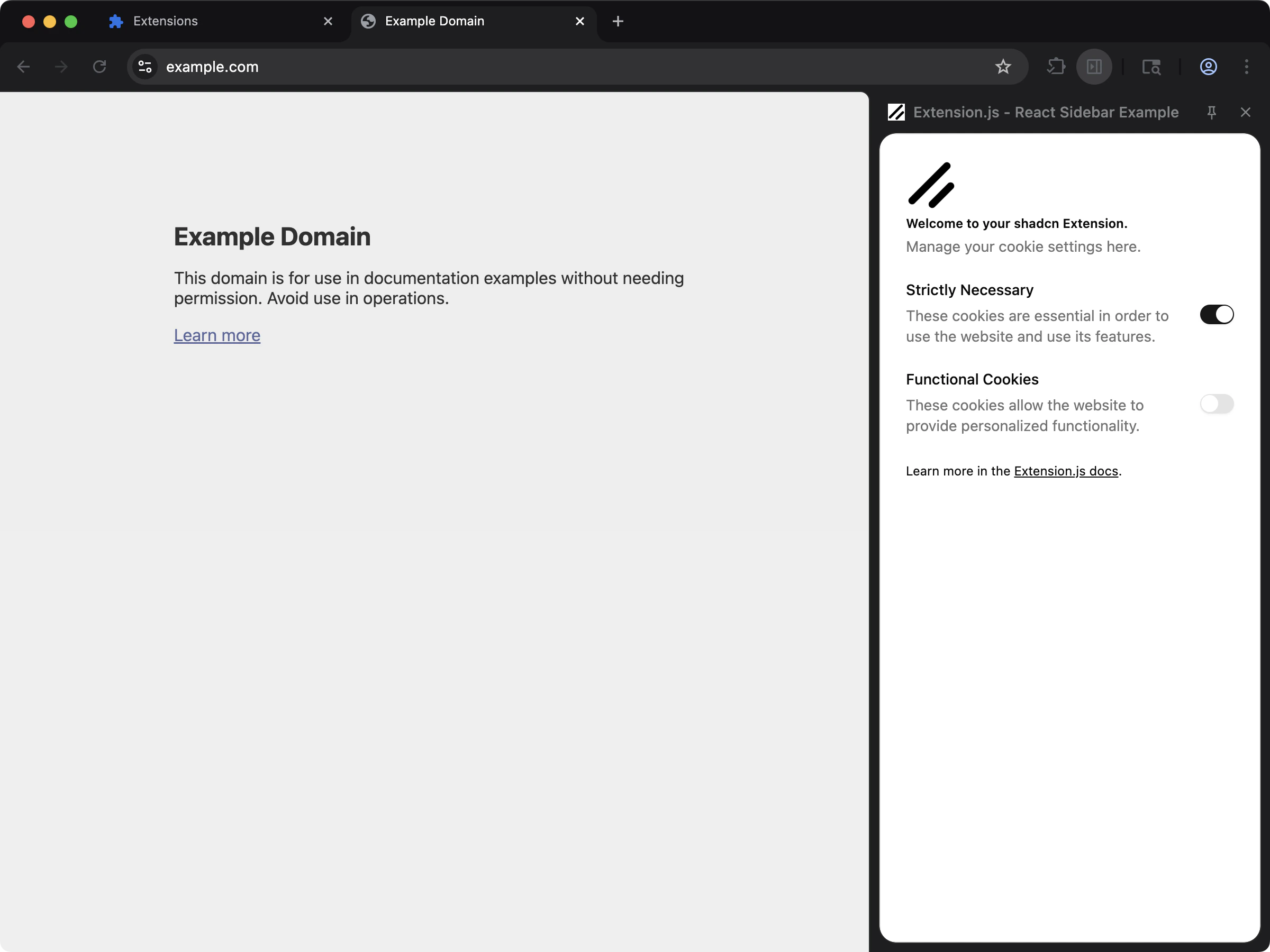
把 `sidebar-shadcn` 範本當作預設起點:
 ```bash npm theme={null}
npx extension@latest create my-extension --template=sidebar-shadcn
```
```bash pnpm theme={null}
pnpx extension@latest create my-extension --template=sidebar-shadcn
```
```bash yarn theme={null}
yarn dlx extension@latest create my-extension --template=sidebar-shadcn
```
```bash bun theme={null}
bunx extension@latest create my-extension --template=sidebar-shadcn
```
```bash bun theme={null}
bunx extension@latest create my-extension --template=sidebar-shadcn
```
這個範本包含一個可運作的 React sidebar UI,並採用 Tailwind + shadcn 風格的元件結構。
Repository: [examples/sidebar-shadcn](https://github.com/extension-js/examples/tree/main/examples/sidebar-shadcn)
## 技術棧假設
* React + TypeScript
* Tailwind CSS
* PostCSS(`@tailwindcss/postcss`)
* 本機的 `components/ui/*` 元件檔(shadcn 風格的結構)
## 在既有專案中手動設定
1. 設定 Tailwind 與 PostCSS(請參考 [Tailwind CSS](/docs/integrations/tailwindcss))。
2. 在專案中初始化 shadcn,並產生元件。
3. 將產生的 UI 元件放在擴充功能原始碼中(例如 `src/components/ui/`)。
4. 在 UI 渲染的擴充功能入口檔匯入你的 Tailwind 樣式表。
### PostCSS 範例(Tailwind v4)
```js theme={null}
export default {
plugins: {
"@tailwindcss/postcss": {},
},
};
```
### `components.json` 範例
```json theme={null}
{
"$schema": "https://ui.shadcn.com/schema.json",
"style": "new-york",
"tsx": true,
"tailwind": {
"css": "sidebar/styles.css",
"cssVariables": true
}
}
```
## 使用方式
從本機 import 使用產生的元件:
```tsx theme={null}
import { Button } from "@/components/ui/button";
import "./styles.css";
export default function MyComponent() {
return ;
}
```
## Content script 注意事項
* 擴充功能頁面(popup、options、sidebar、new tab)是 shadcn/ui 最容易上手的場景。
* 對於 content script,請在 content script 入口檔中匯入你的樣式入口。
* Extension.js 會透過自身的 CSS pipeline 輸出 content script 樣式,這些樣式仍可能與宿主頁面樣式衝突。
如果你需要在 content script 中更強的隔離,請把 UI 掛載在 Shadow DOM 根節點(這是一個用來封裝樣式與標記的瀏覽器 API),並有意識地限定你的 class 名稱範圍。
## 最佳實務
* 把 shadcn/ui 當作以原始碼為主的元件,而不是執行期匯入的 UI 套件。
* 讓 Tailwind 的 config/content 路徑與你的擴充功能資料夾(`pages`、`scripts`、`src`)對齊。
* 先從單一介面(例如 sidebar 或 popup)開始,再處理 content script 的渲染複雜度。
* 將共用 token 與 utility helper 放在專屬檔案中(`lib/utils`、設計 token、主題變數)。
## 下一步
* 若尚未設定,請先設定 [Tailwind CSS](/docs/integrations/tailwindcss)。
* 透過 [ESLint](/docs/integrations/eslint) 與 [Prettier](/docs/integrations/prettier) 加入檢查與格式化。
```bash npm theme={null}
npx extension@latest create my-extension --template=sidebar-shadcn
```
```bash pnpm theme={null}
pnpx extension@latest create my-extension --template=sidebar-shadcn
```
```bash yarn theme={null}
yarn dlx extension@latest create my-extension --template=sidebar-shadcn
```
```bash bun theme={null}
bunx extension@latest create my-extension --template=sidebar-shadcn
```
```bash bun theme={null}
bunx extension@latest create my-extension --template=sidebar-shadcn
```
這個範本包含一個可運作的 React sidebar UI,並採用 Tailwind + shadcn 風格的元件結構。
Repository: [examples/sidebar-shadcn](https://github.com/extension-js/examples/tree/main/examples/sidebar-shadcn)
## 技術棧假設
* React + TypeScript
* Tailwind CSS
* PostCSS(`@tailwindcss/postcss`)
* 本機的 `components/ui/*` 元件檔(shadcn 風格的結構)
## 在既有專案中手動設定
1. 設定 Tailwind 與 PostCSS(請參考 [Tailwind CSS](/docs/integrations/tailwindcss))。
2. 在專案中初始化 shadcn,並產生元件。
3. 將產生的 UI 元件放在擴充功能原始碼中(例如 `src/components/ui/`)。
4. 在 UI 渲染的擴充功能入口檔匯入你的 Tailwind 樣式表。
### PostCSS 範例(Tailwind v4)
```js theme={null}
export default {
plugins: {
"@tailwindcss/postcss": {},
},
};
```
### `components.json` 範例
```json theme={null}
{
"$schema": "https://ui.shadcn.com/schema.json",
"style": "new-york",
"tsx": true,
"tailwind": {
"css": "sidebar/styles.css",
"cssVariables": true
}
}
```
## 使用方式
從本機 import 使用產生的元件:
```tsx theme={null}
import { Button } from "@/components/ui/button";
import "./styles.css";
export default function MyComponent() {
return ;
}
```
## Content script 注意事項
* 擴充功能頁面(popup、options、sidebar、new tab)是 shadcn/ui 最容易上手的場景。
* 對於 content script,請在 content script 入口檔中匯入你的樣式入口。
* Extension.js 會透過自身的 CSS pipeline 輸出 content script 樣式,這些樣式仍可能與宿主頁面樣式衝突。
如果你需要在 content script 中更強的隔離,請把 UI 掛載在 Shadow DOM 根節點(這是一個用來封裝樣式與標記的瀏覽器 API),並有意識地限定你的 class 名稱範圍。
## 最佳實務
* 把 shadcn/ui 當作以原始碼為主的元件,而不是執行期匯入的 UI 套件。
* 讓 Tailwind 的 config/content 路徑與你的擴充功能資料夾(`pages`、`scripts`、`src`)對齊。
* 先從單一介面(例如 sidebar 或 popup)開始,再處理 content script 的渲染複雜度。
* 將共用 token 與 utility helper 放在專屬檔案中(`lib/utils`、設計 token、主題變數)。
## 下一步
* 若尚未設定,請先設定 [Tailwind CSS](/docs/integrations/tailwindcss)。
* 透過 [ESLint](/docs/integrations/eslint) 與 [Prettier](/docs/integrations/prettier) 加入檢查與格式化。