> ## Documentation Index
> Fetch the complete documentation index at: https://extension.js.org/llms.txt
> Use this file to discover all available pages before exploring further.
# 用於頁面、腳本與資產的特殊資料夾
> 用特殊資料夾管理 manifest.json 入口之外的額外頁面、注入腳本、靜態資產與附屬擴充功能。
當擴充功能需要無法乾淨放入 `manifest.json` 的 entrypoint 或資產時,使用特殊資料夾。
處理額外頁面、執行階段注入的腳本、需要精確路徑的靜態資產,以及本機開發用的附屬擴充功能,而不破壞專案結構。
## 範本範例
### `special-folders-pages`
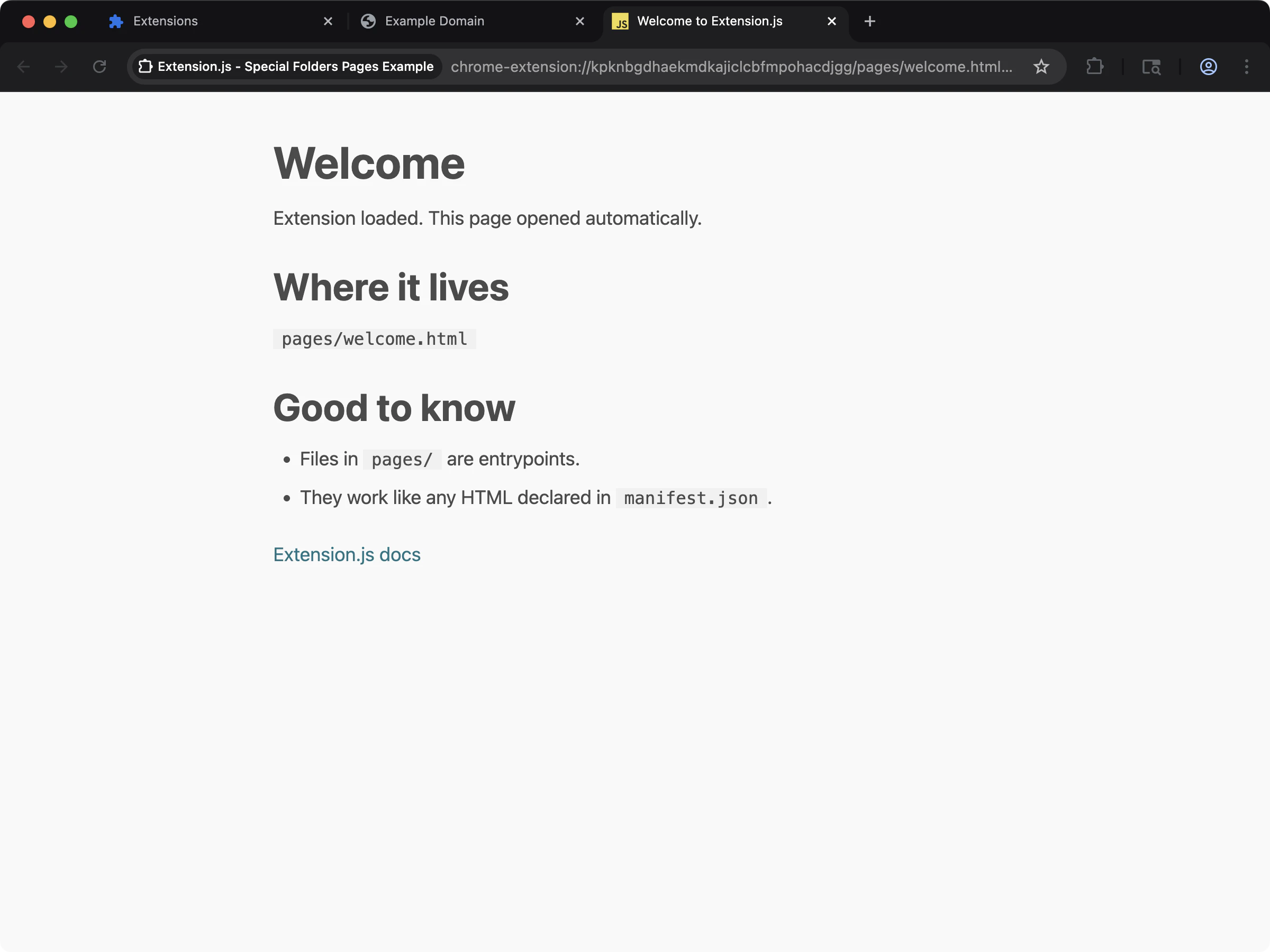 透過額外的 HTML entrypoint,實際看看 `pages/` 特殊資料夾的運作。
```bash npm theme={null}
npx extension@latest create my-extension --template=special-folders-pages
```
```bash pnpm theme={null}
pnpx extension@latest create my-extension --template=special-folders-pages
```
```bash yarn theme={null}
yarn dlx extension@latest create my-extension --template=special-folders-pages
```
```bash bun theme={null}
bunx extension@latest create my-extension --template=special-folders-pages
```
```bash bun theme={null}
bunx extension@latest create my-extension --template=special-folders-pages
```
儲存庫:[extension-js/examples/special-folders-pages](https://github.com/extension-js/examples/tree/main/examples/special-folders-pages)
### `special-folders-scripts`
透過額外的 HTML entrypoint,實際看看 `pages/` 特殊資料夾的運作。
```bash npm theme={null}
npx extension@latest create my-extension --template=special-folders-pages
```
```bash pnpm theme={null}
pnpx extension@latest create my-extension --template=special-folders-pages
```
```bash yarn theme={null}
yarn dlx extension@latest create my-extension --template=special-folders-pages
```
```bash bun theme={null}
bunx extension@latest create my-extension --template=special-folders-pages
```
```bash bun theme={null}
bunx extension@latest create my-extension --template=special-folders-pages
```
儲存庫:[extension-js/examples/special-folders-pages](https://github.com/extension-js/examples/tree/main/examples/special-folders-pages)
### `special-folders-scripts`
 透過獨立的腳本 entrypoint,實際看看 `scripts/` 特殊資料夾的運作。
```bash npm theme={null}
npx extension@latest create my-extension --template=special-folders-scripts
```
```bash pnpm theme={null}
pnpx extension@latest create my-extension --template=special-folders-scripts
```
```bash yarn theme={null}
yarn dlx extension@latest create my-extension --template=special-folders-scripts
```
```bash bun theme={null}
bunx extension@latest create my-extension --template=special-folders-scripts
```
```bash bun theme={null}
bunx extension@latest create my-extension --template=special-folders-scripts
```
儲存庫:[extension-js/examples/special-folders-scripts](https://github.com/extension-js/examples/tree/main/examples/special-folders-scripts)
## 為什麼這很重要
manifest 並未直接宣告許多擴充功能檔案,包括 iframe 頁面、你以 `chrome.scripting.executeScript` 動態注入的腳本,以及靜態廠商資產。你在開發階段可能也需要附屬擴充功能。特殊資料夾讓這些都成為建置流水線中的一等公民。
## 運作方式
每個特殊資料夾都有特定角色:
| 資料夾名稱 | 說明 |
| ------------- | --------------------------------------------------- |
| `pages/` | 即使 manifest 未列出,也會把 HTML 頁面加入編譯作為 entrypoint。 |
| `scripts/` | 即使 manifest 或 HTML 都未引用,也會把腳本檔案加入編譯作為 entrypoint。 |
| `public/` | 把靜態資產原封不動複製到輸出根目錄(`public/**` → `dist/**`),不做打包或轉換。 |
| `extensions/` | 提供慣例位置,用於 dev/preview/start 流程中載入(不建置)附屬擴充功能。 |
## `pages/`:額外的 HTML entrypoint
`pages/` 用來放置額外的擴充功能頁面,例如 sandbox iframe、診斷頁面或內部工具。
Extension.js 會把 `pages/` 中的每個 `.html` 視為 entrypoint,並像 manifest 宣告的頁面一樣編譯。
關於 sandbox iframe 範例,請參考 [Chrome Sandbox Sample](https://github.com/GoogleChrome/chrome-extensions-samples/tree/main/api-samples/sandbox/sandbox)。
## `scripts/`:獨立的腳本 entrypoint
`scripts/` 用來放置動態載入、不綁定特定 HTML 頁面 entry 的可執行腳本。
Extension.js 會把 `scripts/` 中的檔案編譯為 entrypoint,並使用與專案其他部分相同的副檔名解析流程。
### 重要合約
當你用 `scripts/` entry 作為類似 content script 的執行階段 entry 時,請遵循 content script 初始化模式。這是 Extension.js 預期的預設匯出合約,可確保注入腳本的熱重載安全:
* 匯出一個預設函式。
* 在函式內進行設定。
* 可選擇回傳一個同步的清理函式。
這在開發階段最重要,Extension.js 會安全地重新掛載類 content script 的 entry,而不是進行完整的頁面重載。
### `scripts/` 不允許 Node.js 腳本
Extension.js 會把 `scripts/` 內的每個檔案以瀏覽器 content-script 掛載 runtime 包起來。如果你把 Node.js 專用檔案(例如 CLI 啟動器或建置輔助工具)放在這裡,包裝會破壞檔案。
shebang 不再位於第 1 行,且瀏覽器情境中無法使用僅限 Node 的 API。
Extension.js 會偵測兩種 Node.js 指標,並在建置時拋出錯誤:
* 第 1 行的 shebang(`#!/usr/bin/env node`)。
* 來自 `node:` 協定的 import(例如 `import fs from 'node:fs'`)。
如果你看到 `scripts/ is a reserved folder in Extension.js`,請把檔案移到專案
根目錄下的其他資料夾,例如 `bin/`、`tools/`、`ops/`、`tasks/` 或
`ci-scripts/`。
關於動態注入範例,請參考 [Chrome Scripting Sample](https://github.com/GoogleChrome/chrome-extensions-samples/tree/main/api-samples/scripting)。
## `public/`:僅複製的靜態資產
當你需要穩定的檔案路徑且不需打包/轉換時,使用 `public/`。
Extension.js 會把 `public/` 下的所有內容 1:1 複製到輸出根目錄。
### 重要的 `public/` 防護
不要把 `manifest.json` 放在 `public/manifest.json`。Extension.js 會阻擋這種情況,避免在編譯時覆蓋產生的 manifest。
## `extensions/`:附屬擴充功能(僅載入)
當你使用附屬擴充功能(例如 DevTools 輔助工具)時,Extension.js 在 dev/preview/start 流程中支援 `extensions/` 資料夾作為僅載入來源。
整體而言:
* 掃描 `extensions/` 下含有 `manifest.json` 的子資料夾作為解壓後的擴充功能根目錄。
* Extension.js 會將附屬擴充功能與主要擴充功能一起載入。
* 此資料夾用於載入附屬擴充功能,而非把它們建置進主產物。
你也可以透過 `--extensions` CLI 旗標或 `extension.config.js` 中的 `extensions` 鍵載入附屬擴充功能:
```bash theme={null}
# Load from a local folder
extension dev --extensions ./path/to/companion
# Load from Chrome Web Store or Firefox Add-ons
extension dev --extensions "https://chromewebstore.google.com/detail/react-developer-tools/fmkadmapgofadopljbjfkapdkoienihi"
```
Extension.js 會自動下載、解壓並把商店 URL 與你的擴充功能一起載入。
## 開發行為(監看模式)
在開發監看模式下,Extension.js 會監控 `pages/` 與 `scripts/` 的檔案集合變更:
* 新增支援的檔案會觸發警告(你可以繼續工作)。
* 移除支援的檔案會觸發編譯錯誤,需要重新啟動開發伺服器才能恢復。
這能保護執行中的編譯圖,避免出現過期或損壞的 entrypoint。
## 最佳實務
* **共用執行階段資產放在 `public/`**:用在必須保持名稱與路徑精確的檔案。
* **`pages/` 與 `scripts/` 用於真正的 entrypoint**:讓 manifest 之外的執行路徑保持明確。
* **entrypoint 變更後重啟開發伺服器**:特別是刪除 `pages/` 或 `scripts/` 下的檔案後。
* **附屬擴充功能保持獨立**:把 `extensions/` 視為本地工作流程的僅載入相依。
* **`public/` 中不要放 `manifest.json`**:Extension.js 會阻擋 `public/manifest.json` 以保護產生的擴充功能輸出。
## 下一步
* 進一步了解 [頁面重新載入與 hot module replacement(HMR)](/docs/features/reload-and-hmr)。
* 在 [Content scripts](/docs/implementation-guide/content-scripts) 了解掛載合約。
* 瀏覽 [Templates](/docs/getting-started/templates) 來建立你的下一個擴充功能。
透過獨立的腳本 entrypoint,實際看看 `scripts/` 特殊資料夾的運作。
```bash npm theme={null}
npx extension@latest create my-extension --template=special-folders-scripts
```
```bash pnpm theme={null}
pnpx extension@latest create my-extension --template=special-folders-scripts
```
```bash yarn theme={null}
yarn dlx extension@latest create my-extension --template=special-folders-scripts
```
```bash bun theme={null}
bunx extension@latest create my-extension --template=special-folders-scripts
```
```bash bun theme={null}
bunx extension@latest create my-extension --template=special-folders-scripts
```
儲存庫:[extension-js/examples/special-folders-scripts](https://github.com/extension-js/examples/tree/main/examples/special-folders-scripts)
## 為什麼這很重要
manifest 並未直接宣告許多擴充功能檔案,包括 iframe 頁面、你以 `chrome.scripting.executeScript` 動態注入的腳本,以及靜態廠商資產。你在開發階段可能也需要附屬擴充功能。特殊資料夾讓這些都成為建置流水線中的一等公民。
## 運作方式
每個特殊資料夾都有特定角色:
| 資料夾名稱 | 說明 |
| ------------- | --------------------------------------------------- |
| `pages/` | 即使 manifest 未列出,也會把 HTML 頁面加入編譯作為 entrypoint。 |
| `scripts/` | 即使 manifest 或 HTML 都未引用,也會把腳本檔案加入編譯作為 entrypoint。 |
| `public/` | 把靜態資產原封不動複製到輸出根目錄(`public/**` → `dist/**`),不做打包或轉換。 |
| `extensions/` | 提供慣例位置,用於 dev/preview/start 流程中載入(不建置)附屬擴充功能。 |
## `pages/`:額外的 HTML entrypoint
`pages/` 用來放置額外的擴充功能頁面,例如 sandbox iframe、診斷頁面或內部工具。
Extension.js 會把 `pages/` 中的每個 `.html` 視為 entrypoint,並像 manifest 宣告的頁面一樣編譯。
關於 sandbox iframe 範例,請參考 [Chrome Sandbox Sample](https://github.com/GoogleChrome/chrome-extensions-samples/tree/main/api-samples/sandbox/sandbox)。
## `scripts/`:獨立的腳本 entrypoint
`scripts/` 用來放置動態載入、不綁定特定 HTML 頁面 entry 的可執行腳本。
Extension.js 會把 `scripts/` 中的檔案編譯為 entrypoint,並使用與專案其他部分相同的副檔名解析流程。
### 重要合約
當你用 `scripts/` entry 作為類似 content script 的執行階段 entry 時,請遵循 content script 初始化模式。這是 Extension.js 預期的預設匯出合約,可確保注入腳本的熱重載安全:
* 匯出一個預設函式。
* 在函式內進行設定。
* 可選擇回傳一個同步的清理函式。
這在開發階段最重要,Extension.js 會安全地重新掛載類 content script 的 entry,而不是進行完整的頁面重載。
### `scripts/` 不允許 Node.js 腳本
Extension.js 會把 `scripts/` 內的每個檔案以瀏覽器 content-script 掛載 runtime 包起來。如果你把 Node.js 專用檔案(例如 CLI 啟動器或建置輔助工具)放在這裡,包裝會破壞檔案。
shebang 不再位於第 1 行,且瀏覽器情境中無法使用僅限 Node 的 API。
Extension.js 會偵測兩種 Node.js 指標,並在建置時拋出錯誤:
* 第 1 行的 shebang(`#!/usr/bin/env node`)。
* 來自 `node:` 協定的 import(例如 `import fs from 'node:fs'`)。
如果你看到 `scripts/ is a reserved folder in Extension.js`,請把檔案移到專案
根目錄下的其他資料夾,例如 `bin/`、`tools/`、`ops/`、`tasks/` 或
`ci-scripts/`。
關於動態注入範例,請參考 [Chrome Scripting Sample](https://github.com/GoogleChrome/chrome-extensions-samples/tree/main/api-samples/scripting)。
## `public/`:僅複製的靜態資產
當你需要穩定的檔案路徑且不需打包/轉換時,使用 `public/`。
Extension.js 會把 `public/` 下的所有內容 1:1 複製到輸出根目錄。
### 重要的 `public/` 防護
不要把 `manifest.json` 放在 `public/manifest.json`。Extension.js 會阻擋這種情況,避免在編譯時覆蓋產生的 manifest。
## `extensions/`:附屬擴充功能(僅載入)
當你使用附屬擴充功能(例如 DevTools 輔助工具)時,Extension.js 在 dev/preview/start 流程中支援 `extensions/` 資料夾作為僅載入來源。
整體而言:
* 掃描 `extensions/` 下含有 `manifest.json` 的子資料夾作為解壓後的擴充功能根目錄。
* Extension.js 會將附屬擴充功能與主要擴充功能一起載入。
* 此資料夾用於載入附屬擴充功能,而非把它們建置進主產物。
你也可以透過 `--extensions` CLI 旗標或 `extension.config.js` 中的 `extensions` 鍵載入附屬擴充功能:
```bash theme={null}
# Load from a local folder
extension dev --extensions ./path/to/companion
# Load from Chrome Web Store or Firefox Add-ons
extension dev --extensions "https://chromewebstore.google.com/detail/react-developer-tools/fmkadmapgofadopljbjfkapdkoienihi"
```
Extension.js 會自動下載、解壓並把商店 URL 與你的擴充功能一起載入。
## 開發行為(監看模式)
在開發監看模式下,Extension.js 會監控 `pages/` 與 `scripts/` 的檔案集合變更:
* 新增支援的檔案會觸發警告(你可以繼續工作)。
* 移除支援的檔案會觸發編譯錯誤,需要重新啟動開發伺服器才能恢復。
這能保護執行中的編譯圖,避免出現過期或損壞的 entrypoint。
## 最佳實務
* **共用執行階段資產放在 `public/`**:用在必須保持名稱與路徑精確的檔案。
* **`pages/` 與 `scripts/` 用於真正的 entrypoint**:讓 manifest 之外的執行路徑保持明確。
* **entrypoint 變更後重啟開發伺服器**:特別是刪除 `pages/` 或 `scripts/` 下的檔案後。
* **附屬擴充功能保持獨立**:把 `extensions/` 視為本地工作流程的僅載入相依。
* **`public/` 中不要放 `manifest.json`**:Extension.js 會阻擋 `public/manifest.json` 以保護產生的擴充功能輸出。
## 下一步
* 進一步了解 [頁面重新載入與 hot module replacement(HMR)](/docs/features/reload-and-hmr)。
* 在 [Content scripts](/docs/implementation-guide/content-scripts) 了解掛載合約。
* 瀏覽 [Templates](/docs/getting-started/templates) 來建立你的下一個擴充功能。