> ## Documentation Index
> Fetch the complete documentation index at: https://extension.js.org/llms.txt
> Use this file to discover all available pages before exploring further.
# Web-accessible 资源与构建期合并
> 只暴露网页确实需要的扩展资源。Extension.js 会自动把用户声明的 web_accessible_resources 与构建期的需求合并起来。
只暴露网页或外部扩展上下文必须访问的扩展资源。
Extension.js 会把用户声明的 `web_accessible_resources` 与构建期发现的需求合并起来,并应用针对目标的 manifest 归一化。
## 模板示例
### `content`
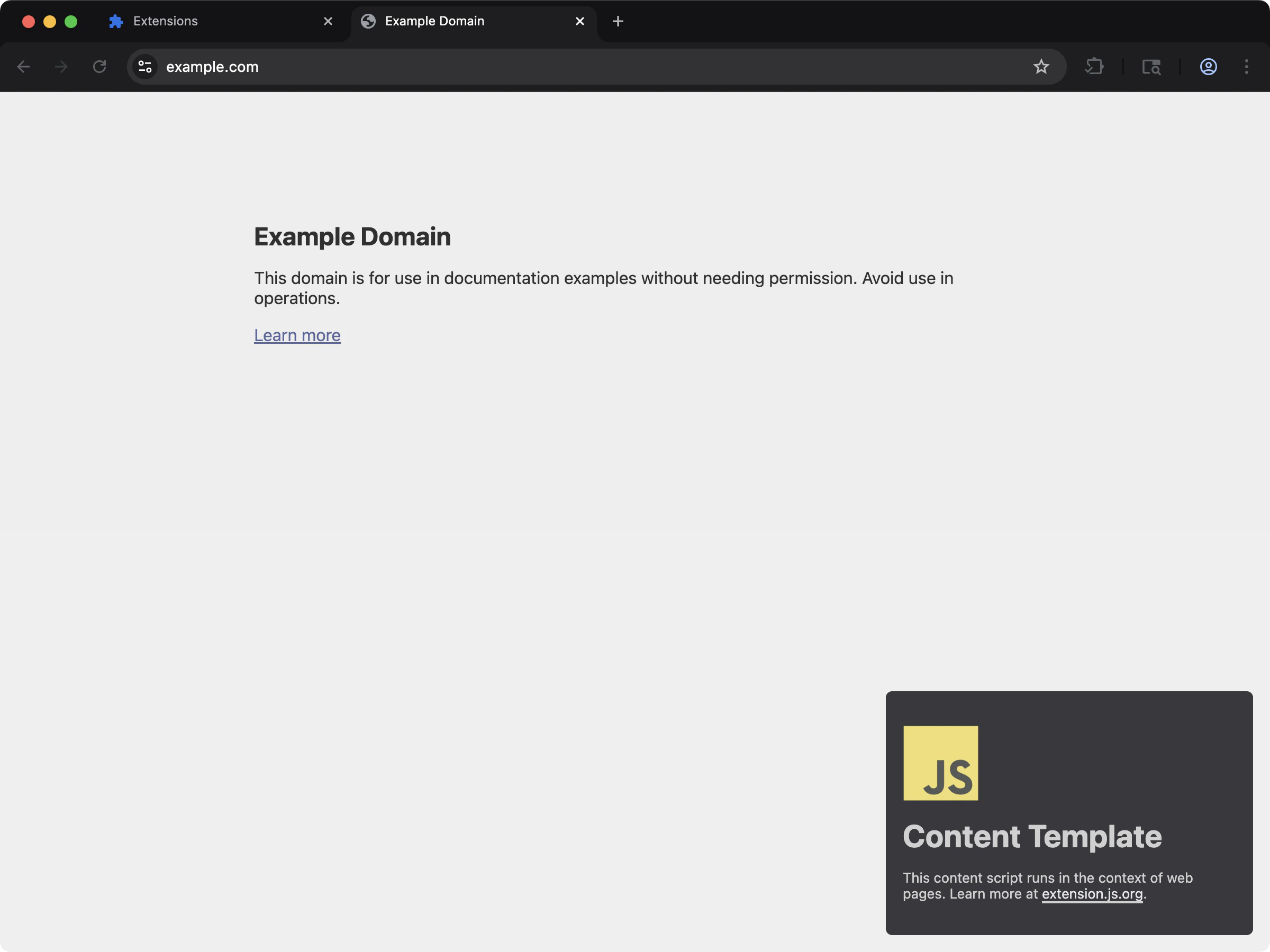 Content script 使用 web-accessible 资源把样式和资源注入页面。
```bash npm theme={null}
npx extension@latest create my-extension --template=content
```
```bash pnpm theme={null}
pnpx extension@latest create my-extension --template=content
```
```bash yarn theme={null}
yarn dlx extension@latest create my-extension --template=content
```
```bash bun theme={null}
bunx extension@latest create my-extension --template=content
```
```bash bun theme={null}
bunx extension@latest create my-extension --template=content
```
仓库:[extension-js/examples/content](https://github.com/extension-js/examples/tree/main/examples/content)
## Web-accessible 资源能力
| 能力 | 你会得到什么 |
| ------------------------ | ------------------------------------------------------ |
| Manifest V2/V3 schema 处理 | 按 manifest 版本分别处理数组形式与对象形式的 `web_accessible_resources` |
| 构建感知的合并 | 把声明的资源与构建/运行时所需的入口结合起来 |
| 路径归一 | 为每个浏览器目标把 WAR(web-accessible resource)路径解析到正确的输出位置 |
| 安全控制面 | 通过 `resources` 与 `matches` 让访问规则保持显式 |
## Manifest schema
### Manifest V3
```json theme={null}
{
"web_accessible_resources": [
{
"resources": ["images/*.png", "fonts/*.woff2"],
"matches": [""]
}
]
}
```
### Manifest V2
```json theme={null}
{
"web_accessible_resources": ["images/*.png", "scripts/*.js", "styles/*.css"]
}
```
## `manifest.json` 文件示例
如果你通过受支持的 content script 或构建路径导入资源,Extension.js 会自动添加所需的 WAR 条目。如果网页需要直接访问特定资源,请手动声明这些资源。
```json theme={null}
{
"manifest_version": 3,
"name": "My Extension",
"version": "1.0.0",
"web_accessible_resources": [
{
"resources": ["images/*.png", "scripts/*.js", "styles/*.css"],
"matches": [""]
}
],
"content_scripts": [
{
"matches": ["https://example.com/*"],
"css": ["styles/content.css"],
"js": ["scripts/content.js"]
}
]
}
```
## Extension.js 自动添加的内容
当运行时需要某些构建产物对页面可访问时,Extension.js 可以根据构建输出扩展 WAR 条目。
常见示例包括:
* 由 content script 导入的资源。
* Content script 的 CSS 产物。
* 由这些入口引用的输出字体或静态资源。
* 仅开发期使用、用于支持重载行为的运行时辅助资源。
自动包含很方便,但你仍然应当审视最终暴露给网页的资源集合。
## 开发期行为
* 在开发期,Extension.js 会修补 WAR 条目,以支持重载和热模块替换(HMR)的资源访问。
* 在需要时,Extension.js 可以自动把与 content script 相关的资源加入 WAR。
* Extension.js 会通过移除 `public/` 前缀和开头的 `/` 来归一化路径,生成输出安全的路径。
## 输出与解析说明
* Extension.js 通过 public 资源流复制 `public/` 中的资源,你可以从扩展根路径声明它们。
* 相对 WAR 资源路径会从 manifest 所在目录解析。
* 你可以使用 glob,但匹配模式必须满足目标浏览器的约束。
* Extension.js 在归一化时会丢弃没有 `resources` 的 Manifest V3(MV3)条目。
* Extension.js 会保留原样的 glob,不会把它们展开为显式的文件列表。
## 运行时用法
请使用浏览器运行时 URL 辅助方法,而不要手动拼接扩展 URL:
```ts theme={null}
const logoUrl = chrome.runtime.getURL("/images/logo.png");
```
如果某个页面或 content script 无法读取你以为可访问的资源,请检查:
1. 该资源是否实际存在于产物中。
2. WAR 条目是否暴露了正确的 `resources`。
3. `matches` 范围是否包含正在尝试读取它的页面。
4. 该资源是否应当只保留给扩展页面访问。
## 最佳实践
* 让 WAR 条目最小化;只暴露外部上下文必须读取的资源。
* 出于安全考虑,优先使用显式的资源路径,而不是宽泛的 glob。
* 在 Chromium 与 Firefox 目标之间校验 WAR 匹配模式与资源路径。
* 使用 `chrome.runtime.getURL()`/`browser.runtime.getURL()` 创建运行时安全的 URL。
* 每当新增 content script 导入、字体或可被页面访问的静态资源时,重新审视 WAR。
### 安全清单
* 把 `matches` 范围限定到确实需要访问的域名。
* 当一个小而显式的列表足够时,避免使用宽泛的通配资源 glob。
* 让 WAR 条目聚焦于非敏感资源。
* 当新增 content script 导入或运行时资源查找时,重新审视 WAR。
### 收敛与过宽的示例
```json theme={null}
{
"web_accessible_resources": [
{
"resources": ["images/logo.png", "fonts/inter.woff2"],
"matches": ["https://example.com/*"]
}
]
}
```
```json theme={null}
{
"web_accessible_resources": [
{
"resources": ["*"],
"matches": [""]
}
]
}
```
## 下一步
* 在 [dev 更新行为](/docs/workflows/dev-update-behavior) 中了解更新结果。
* 进一步了解 [特殊文件夹](/docs/features/special-folders)。
* 继续阅读 [命令参考](/docs/commands/dev)。
Content script 使用 web-accessible 资源把样式和资源注入页面。
```bash npm theme={null}
npx extension@latest create my-extension --template=content
```
```bash pnpm theme={null}
pnpx extension@latest create my-extension --template=content
```
```bash yarn theme={null}
yarn dlx extension@latest create my-extension --template=content
```
```bash bun theme={null}
bunx extension@latest create my-extension --template=content
```
```bash bun theme={null}
bunx extension@latest create my-extension --template=content
```
仓库:[extension-js/examples/content](https://github.com/extension-js/examples/tree/main/examples/content)
## Web-accessible 资源能力
| 能力 | 你会得到什么 |
| ------------------------ | ------------------------------------------------------ |
| Manifest V2/V3 schema 处理 | 按 manifest 版本分别处理数组形式与对象形式的 `web_accessible_resources` |
| 构建感知的合并 | 把声明的资源与构建/运行时所需的入口结合起来 |
| 路径归一 | 为每个浏览器目标把 WAR(web-accessible resource)路径解析到正确的输出位置 |
| 安全控制面 | 通过 `resources` 与 `matches` 让访问规则保持显式 |
## Manifest schema
### Manifest V3
```json theme={null}
{
"web_accessible_resources": [
{
"resources": ["images/*.png", "fonts/*.woff2"],
"matches": [""]
}
]
}
```
### Manifest V2
```json theme={null}
{
"web_accessible_resources": ["images/*.png", "scripts/*.js", "styles/*.css"]
}
```
## `manifest.json` 文件示例
如果你通过受支持的 content script 或构建路径导入资源,Extension.js 会自动添加所需的 WAR 条目。如果网页需要直接访问特定资源,请手动声明这些资源。
```json theme={null}
{
"manifest_version": 3,
"name": "My Extension",
"version": "1.0.0",
"web_accessible_resources": [
{
"resources": ["images/*.png", "scripts/*.js", "styles/*.css"],
"matches": [""]
}
],
"content_scripts": [
{
"matches": ["https://example.com/*"],
"css": ["styles/content.css"],
"js": ["scripts/content.js"]
}
]
}
```
## Extension.js 自动添加的内容
当运行时需要某些构建产物对页面可访问时,Extension.js 可以根据构建输出扩展 WAR 条目。
常见示例包括:
* 由 content script 导入的资源。
* Content script 的 CSS 产物。
* 由这些入口引用的输出字体或静态资源。
* 仅开发期使用、用于支持重载行为的运行时辅助资源。
自动包含很方便,但你仍然应当审视最终暴露给网页的资源集合。
## 开发期行为
* 在开发期,Extension.js 会修补 WAR 条目,以支持重载和热模块替换(HMR)的资源访问。
* 在需要时,Extension.js 可以自动把与 content script 相关的资源加入 WAR。
* Extension.js 会通过移除 `public/` 前缀和开头的 `/` 来归一化路径,生成输出安全的路径。
## 输出与解析说明
* Extension.js 通过 public 资源流复制 `public/` 中的资源,你可以从扩展根路径声明它们。
* 相对 WAR 资源路径会从 manifest 所在目录解析。
* 你可以使用 glob,但匹配模式必须满足目标浏览器的约束。
* Extension.js 在归一化时会丢弃没有 `resources` 的 Manifest V3(MV3)条目。
* Extension.js 会保留原样的 glob,不会把它们展开为显式的文件列表。
## 运行时用法
请使用浏览器运行时 URL 辅助方法,而不要手动拼接扩展 URL:
```ts theme={null}
const logoUrl = chrome.runtime.getURL("/images/logo.png");
```
如果某个页面或 content script 无法读取你以为可访问的资源,请检查:
1. 该资源是否实际存在于产物中。
2. WAR 条目是否暴露了正确的 `resources`。
3. `matches` 范围是否包含正在尝试读取它的页面。
4. 该资源是否应当只保留给扩展页面访问。
## 最佳实践
* 让 WAR 条目最小化;只暴露外部上下文必须读取的资源。
* 出于安全考虑,优先使用显式的资源路径,而不是宽泛的 glob。
* 在 Chromium 与 Firefox 目标之间校验 WAR 匹配模式与资源路径。
* 使用 `chrome.runtime.getURL()`/`browser.runtime.getURL()` 创建运行时安全的 URL。
* 每当新增 content script 导入、字体或可被页面访问的静态资源时,重新审视 WAR。
### 安全清单
* 把 `matches` 范围限定到确实需要访问的域名。
* 当一个小而显式的列表足够时,避免使用宽泛的通配资源 glob。
* 让 WAR 条目聚焦于非敏感资源。
* 当新增 content script 导入或运行时资源查找时,重新审视 WAR。
### 收敛与过宽的示例
```json theme={null}
{
"web_accessible_resources": [
{
"resources": ["images/logo.png", "fonts/inter.woff2"],
"matches": ["https://example.com/*"]
}
]
}
```
```json theme={null}
{
"web_accessible_resources": [
{
"resources": ["*"],
"matches": [""]
}
]
}
```
## 下一步
* 在 [dev 更新行为](/docs/workflows/dev-update-behavior) 中了解更新结果。
* 进一步了解 [特殊文件夹](/docs/features/special-folders)。
* 继续阅读 [命令参考](/docs/commands/dev)。